how to run an end of year review with live polls that avoid polite consensus
Design an end-of-year team review that cuts through polite consensus, surfaces real friction, and builds alignment for the coming quarter.
· 4 min read · Fiona

Most end-of-year team retrospectives drift into polite applause. The lead presents a slide deck of milestones, asks what people thought of the year, and gets nods from senior staff while quieter contributors stay silent. When team members disagree with how a project went, social pressure keeps them from challenging the narrative out loud.
A live deck changes the room's dynamic if you build it to reveal variance rather than force agreement. Instead of asking for broad impressions, you collect anonymous inputs on specific trade-offs, show the spread on screen, and spend your meeting minutes discussing the gap between expectations and reality.
Open with personal temperature checks before asking for team judgments
Starting directly with critical questions about company goals puts people on the defensive. Begin with low-stakes individual reflections that establish participation without right or wrong answers.
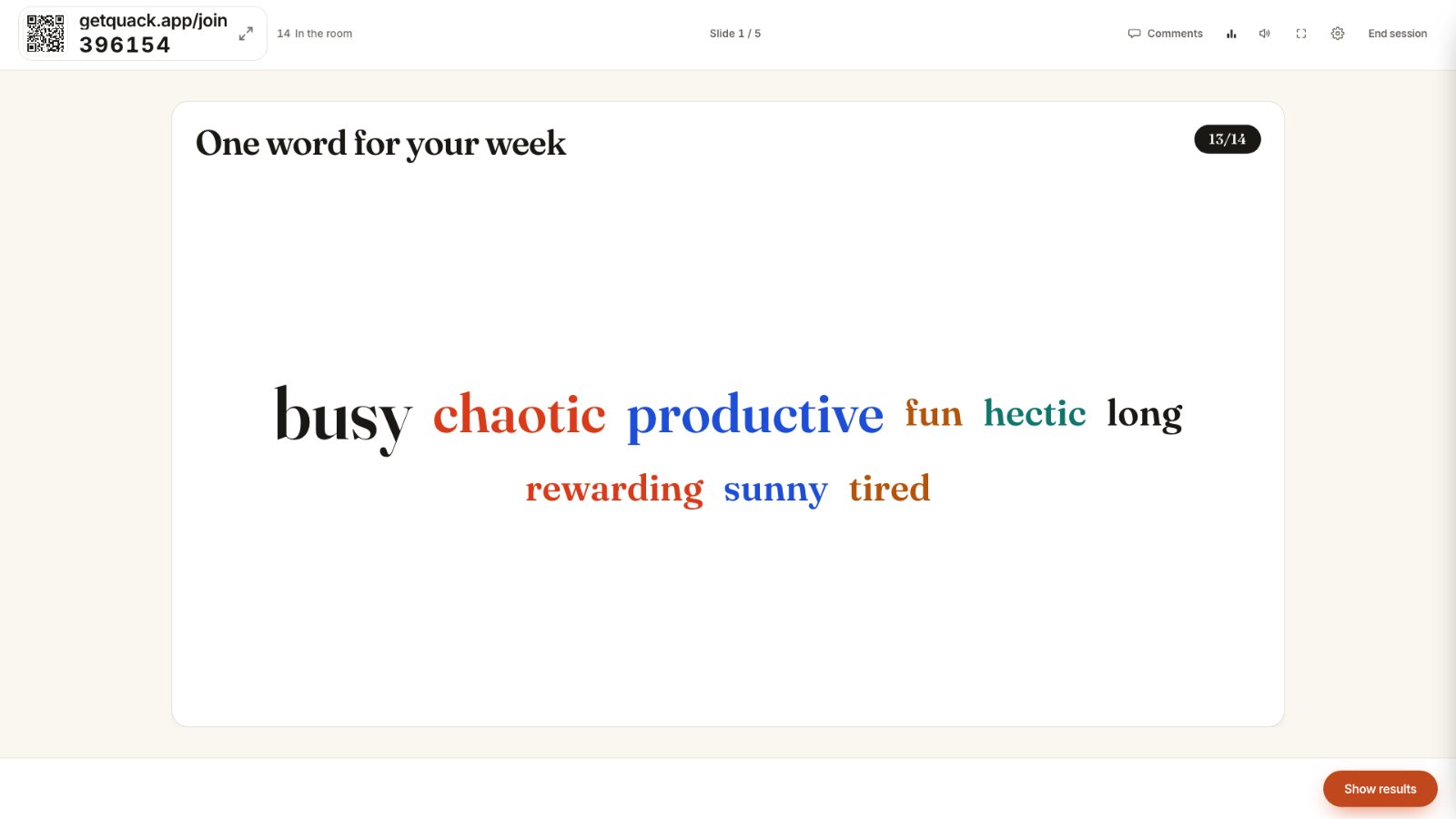
A word cloud works well for the first two minutes. Ask a question such as: "One word describing how your workload felt in November." As words appear, larger terms show shared strain or relief. Because open responses in Quack are anonymous on the big screen, team members can submit honest phrases without attaching their name to a complaint.
Follow the word cloud with a single-choice poll or a This or That question to move the room from reflection to action: "Did this year feel more like building foundations or racing against deadlines?" Giving people only two choices forces a clear stance. When the room splits 60/40, you have immediate proof that colleagues experienced the exact same quarter differently. For advice on phrasing questions that pull out authentic sentiment, see questions that get honest answers.
Replace satisfaction averages with two-axis grids and rating spreads
A 1 to 5 satisfaction rating hides operational friction. If half the team rates internal communication a 1 and the other half rates it a 5, an average of 3 suggests moderate contentment when the reality is division. We examine this structural blind spot in why average scores hide disagreement.
Instead of asking whether processes worked, use a 2×2 grid slide. Label the horizontal axis from Low Impact to High Impact, and the vertical axis from Low Friction to High Friction. Ask each person to plot where a specific initiative landed: cross-team reviews, weekly standups, or the new delivery cadence.
When twenty dots appear across the canvas, patterns stand out immediately:
- Clusters in the High Impact, High Friction quadrant show essential work that is burning people out.
- Outliers in the Low Impact, High Friction area highlight overhead that can be cut immediately.
- Wide divergence along the Impact axis reveals that engineers and project managers do not agree on what actually helped the customer.
Invite the room to examine the visual spread before speaking: "We have five dots in the upper left corner and eight in the lower right. What makes this workflow feel effortless to some people and painful to others?" Phrasing the question around the picture shifts the critique from personal capability to systemic variation.
Force priority trade-offs instead of collecting wish lists
When team leads ask "What should we improve next year?", every department requests more resources, fewer meetings, and clearer roadmaps. A list of twenty good ideas is useless because a team cannot address twenty operational priorities at once.
Use an Allocate Points slide to introduce budget constraints. Give every team member a fixed budget of 100 points to divide across five potential focus areas for the upcoming quarter:
- Technical debt and test automation
- Customer documentation and onboarding
- Internal process speed and meeting reduction
- Cross-department handoffs
- Tooling upgrades
Because nobody can give 100 points to everything, participants must sacrifice good initiatives to support critical ones. The big screen displays which options collected the highest totals. The exercise proves to the team why leadership cannot fund every request, while showing leadership exactly where workers feel the most acute deprivation.
To turn those priorities into clear operational sequences, follow the allocation slide with a Ranking slide. Have the room order the top three focus areas by implementation urgency. Quack combines every player's ranking into one collective order for the room. When you see the team's combined sequencing on screen, you have an agreed baseline for January planning.
Surface unspoken questions before closing commitments
Polite consensus returns during open-floor retrospectives. Junior team members rarely raise governance issues or product doubts when managers ask "Any questions?" from the front of the room.
Run an anonymous Q&A slide before setting final commitments. Give the room three full minutes of silence to type prompts into their phones. Quack allows participants to submit questions up to 200 characters and upvote submissions from peers. Questions with more upvotes rise to the top of the presenter's screen automatically.
Address the top three upvoted questions directly, even if they challenge planning decisions or timeline feasibility. Acknowledging a difficult issue in public does more to build team trust than thirty minutes of celebratory slides. Our guide on running a qna that surfaces the real question covers facilitation techniques for addressing sensitive topics under time limits.
When the review ends, every past session remains accessible in your Quack History tab for 12 months. Export the per-question stats and final results to review the raw feedback alongside your planning spreadsheets.
For your upcoming review, build a deck with four specific slides: a one-word workload cloud, a 2×2 grid on operational friction, a 100-point allocation poll on next quarter's goals, and an upvoted Q&A. Run it with your phones and screen, let the anonymous responses expose the real trade-offs, and spend your retrospective discussing what to fix instead of pretending everything went according to plan.